Switching to a New Dealer Management System Successfully
Moving to a new Dealer Management System (DMS) isn't just a software change, it can be a huge upheaval to the operations of a business. To make the transition as smooth as possible, you need a clear plan, accurate data, testing and time to train your team.
Dealerships that transition successfully usually start by outlining exactly what they want to improve, ensuring their current data is correct and correctly transferred, and testing everything before fully switching over. Most issues arising during a migration don't come from the new system itself, they happen when preparation is rushed.
One issue that a dealership can face when their business is performing well, is that they realise they have outgrown their current DMS for their needs. However, these dealerships are worried about making a change to a new DMS due to the disruption and effort that can come along with it.
What if there were some neat features that a DMS offered that allowed you to seamlessly migrate all your business data and processes, allowing you to switch to a better and more modern DMS without the downtime. This blog will go over when it could be time to migrate to a new DMS; the problems that dealerships may face when thinking about migrating to a new DMS; and how MotorDesk can solve these issues for you.
Why Dealerships Look To Change Their DMS
The most common operational and business reasons a dealership may change its Dealership Management System (DMS):
- Outgrowing current system - increased stock levels or manual workarounds becoming standard in work flows.
- Poor integration - increased manual entry and duplication, increasing the risk of errors.
- Limited reporting - having live insights into your business is key to making informed decisions.
- Inefficient processes - spending more time on admin and data entry, could impact on the length of days in stock.
- Compliance risk - weak audit trails, incomplete data or incorrect calculations increase the risk of non-compliance.
There are a range of reasons why changing DMS is the right decision for your business. you may be thinking about switching to a new DMS.
When Is It Time To Switch To A New DMS?
From a commercial perspective, most software migrations occur when the cost of inefficiency begins to outweigh the short-term disruption of switching to a new provider.
It is not always obvious when your dealership has outgrown its software, especially if the team has adapted to inefficient processes over time. However, there are common warning signs which suggest your current DMS may no longer be meeting your needs.
You may be spending too much time on manual admin, entering the same information in multiple places, relying on spreadsheets outside the system, or struggling to keep stock listings, invoices and customer records aligned. It may also be difficult to access the reports you need, connect your DMS to other systems, or manage newer parts of the dealership such as online reservations, digital communications or website integration.
If your software is making simple tasks harder, limiting visibility across the business or preventing you from improving your processes, switching to a new system may be the right next step.
If you use a system which is not fit for purpose, these shortfalls will translate into each of your customer's experience, which will effectively impact your bottom line.
Common Concerns About Switching
There are so many reasons which may have lead you to delay your migration to a new DMS.
One of the main issues is transferring historical data from the old system into the new one, while ensuring it is complete, accurate and usable. This may include vehicle stock, customer records, invoices, supplier details, sales history and accounting information.
Another challenge is reviewing existing processes. A migration is not just about moving data, it is also about understanding how your dealership currently works and how those processes should operate within the new system. If old habits, duplicated steps or inconsistent records are carried across, the dealership may not benefit fully from the move. Hopefully when you do switch any workarounds your team has adopted will be eliminated.
The willingness of your staff is also a factor. If the team is apprehensive of using a new system, changing their existing way of working, or wary of learning new processes, good onboarding and training are therefore essential to help make the change successful and the benefit realised as soon as possible.
One of the biggest concerns dealerships have when moving to a new DMS is what will happen to their website. Transferring your current domain keeps your web address consistent, helping preserve SEO value, search rankings and ongoing traffic. Starting with a new domain can be an opportunity to rebrand, update the website structure, and doesn't necessarily mean that you will lose the rankings on Google you worked so hard on.
What Should You Look For In A New DMS?
If you are going to invest time in changing systems, it is important to choose a DMS which fits not just your current dealership needs but one that will also scale alongside your business.
You should look for software that brings the main areas of your dealership together in one system. Having everything connected in one place helps reduce duplicated work, improves accuracy and gives you clearer visibility across the business.
It is also important to consider how easy the system is to use, how well it integrates with other platforms, and what migration support is available. A system may have strong features, but without proper support during implementation the transition will feel daunting.
Steps To Aid A Smooth DMS Migration
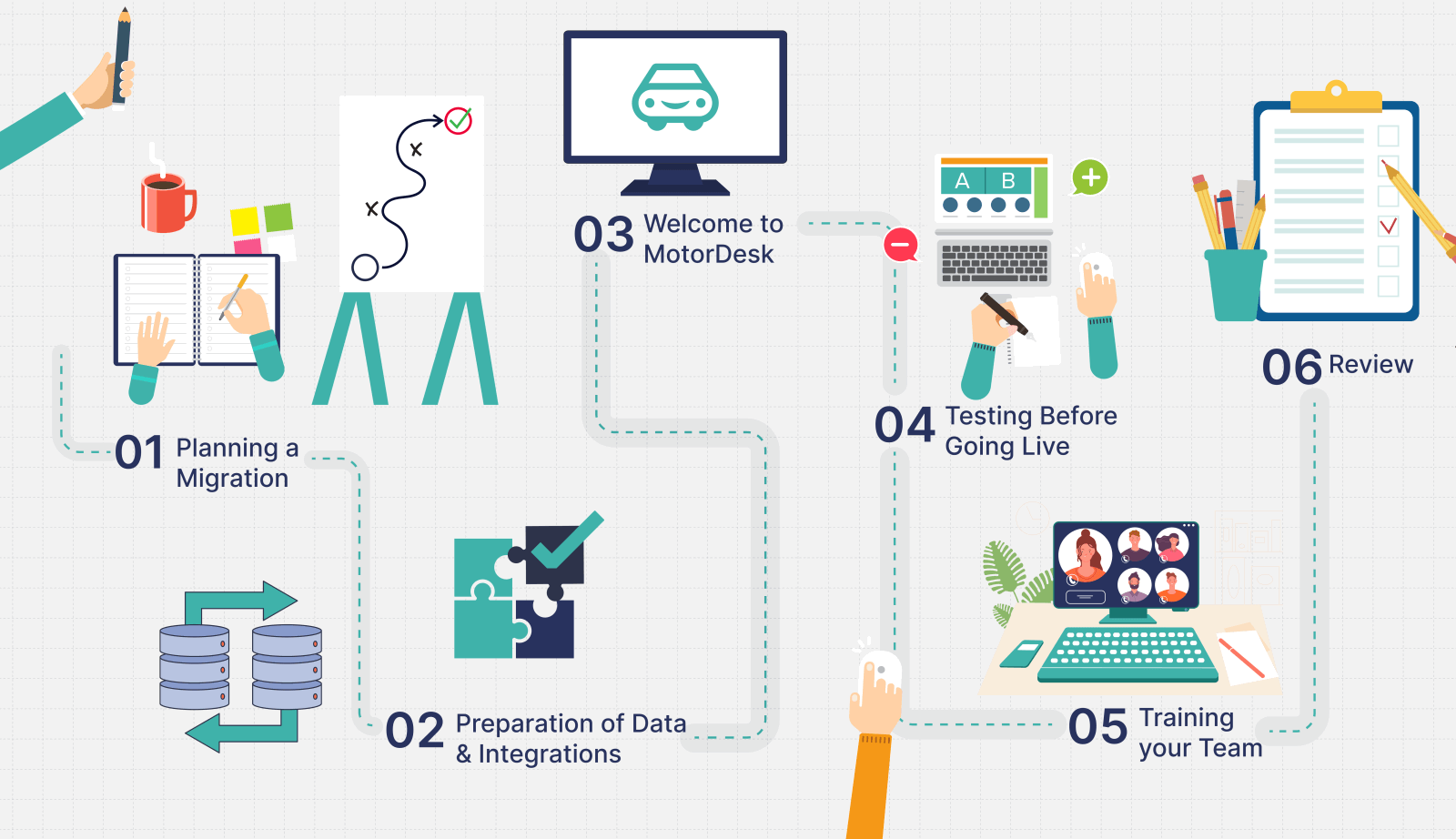
1. Planning a Migration
You've been putting it off for a while, but you know you're going to need to switch sooner rather than later, planning is key to ensure minimal disruption across your business.
Setting a realistic go live date is a key first step. This should give enough time for your dealership to prepare data, review processes, test the system and complete training before relying on the new DMS day to day. It is also helpful to think about the best time for the business to make the move, avoiding particularly busy trading periods where possible.
Plan your domain name migration, and how the change in website will impact your SEO. It's easy to maintain your website's SEO by following simple migration checks like maintaining page URLs, titles and core content.
A good plan should also think about who from your team will be involved, what data needs to be transferred, which processes need to be set up in the new system and what support is available from your new software provider throughout the move.
2. Preparation of Data & Integrations
Before you migrate to your chosen new system, ensuring that the data you are transferring is correct is a key aspect, poor data in a new system is still poor data.
It is a good opportunity to review your existing records and remove duplicated entries, update customer details, check supplier information, review stock records and make sure invoicing data is complete where needed. The cleaner and more accurate your data is before migration, the more value you will get from the new DMS once it is live.
Ensure all website content, URLs, meta data and images are backed up and properly mapped, setting up redirects for old pages whether keeping the current domain or launching a new one to preserve SEO and traffic.
It is also important to prepare any integrations your dealership relies on. Payment providers, marketplace feeds, social media accounts, accounting software synchronisation, CRM tools and communication channels should all be reviewed in advance so they can be connected correctly within the new system. This helps reduce the risk of disruption to your business.
3. Testing before going Live
Before the new DMS is used fully across the dealership, testing is essential, its a good opportunity to identify and correct any issues early on before the system is a part of daily operations.
Testing should include checking that vehicle stock has transferred over correctly, invoices and customer records appear as expected as well as any integrations are working as they should.
Taking the time before going live, gives the dealership the chance to make sure the system is set up in the way that will work best for your business, to ensure you are able to benefit the most from the move.
4. Training your Team
Without training your team, even the best DMS will not deliver its full potential for your dealership.
Sales, admin and management users will often require slightly different training, as each department will use different parts of the system in their day-to-day role. Ensuring that each team has access to the right training from day one will have a direct impact on how quickly efficiency gains are realised across your workflows.
The more confident the team feels using the software, the smoother the transition is likely to be.
5. Review
Once the new DMS is live, it is important to review how the migration has gone and whether there are any areas which need further attention. This could include confirming the integrations are working correctly or following up with staff to ensure they are comfortable with the system and identify any areas which may need further training on.
Migration should not just be about replacing one system with another, it should be about improving how the business operates.
How MotorDesk Helps With Migrations
The MotorDesk team is highly experienced with helping independent motor dealers move from other DMS systems with minimal disruption. For dealerships making the switch, the migration process is supported with practical tools and services to help get your business set up properly from the start.
MotorDesk offers onboarding services and training to help staff across the dealership understand the system and start using it confidently. For dealers who prefer to handle the setup themselves, there is also a step-by-step getting started guide, including a video walkthrough, to help dealers set the system up correctly and understand the key functions available from the outset.
The platform allows you to bulk import contacts, connect your existing accounting software accounts and add vehicles in bulk. Where required, the MotorDesk support team can also help with importing data from third-party sources, including vehicle data from AutoTrader and AA Cars, and contact data from Xero, QuickBooks and Sage, helping to reduce manual entry and maintain synchronisation with third-party systems, whilst making the switch more efficient.
MotorDesk's Historic Data Viewer helps dealerships keep access to previous records after moving from other systems, which can be useful when reviewing older information alongside current live data.
MotorDesk provides dealership websites as standard so that stock, communications, and key pages are connected once you choose to go live. The system also supports third-party websites if you're creating a website yourself, or using an outside website development service or website provider. MotorDesk will also support you in transferring your existing domain to MotorDesk servers. Everything can be optimised and set up to preserve any previous SEO value and maintain your existing search rankings.
Ongoing Support From MotorDesk
Moving to a new DMS is only one part of the process, ongoing support is equally important to help your dealership continues benefiting from the value of the system and to help your team understand any new features added over time.
MotorDesk provides help documentation throughout the software, making support easily accessible while you work. Every section you visit in MotorDesk has an icon in the top right with a detailed set of instructions for that part of the system. This means users can quickly find guidance without needing to leave the platform.
Alongside this, MotorDesk also provides in depth tutorial videos covering all aspects of the software and live chat support, giving dealerships access to further help when needed.
This on-demand help content is paired with our technical support services, available via live chat, email, SMS and WhatsApp, alongside telephone support options.
Get Started
If you're interested in trying the MotorDesk car dealer software we offer a full 30-day free trial! Watch our short demonstration video or book a personalised demo via video call and get 5% discount for 3 months.